Intro
I have used Jupyter notebooks for years, and recently I started trying marimo.
In this post I want to explain why I think it is a very interesting alternative for Python projects, and then show one small example at the end.
Marimo as a Jupyter alternative
I still think Jupyter notebooks are very useful. For quick exploration, ad-hoc analysis, or testing an idea, they are hard to beat.
The problem starts when the notebook stops being temporary.
That is usually the moment where Jupyter begins to show its weak points:
- execution order gets messy
- the in-memory state becomes harder to reason about
- git diffs are annoying
- moving notebook code into a proper project takes extra work
That is why I think marimo is so interesting.
| topic | Jupyter | marimo |
|---|---|---|
| notebook format | notebook file | Python file |
| execution model | manual cell order | dependency-based |
| git diffs | usually noisy | much cleaner |
| UI/app mode | limited | built in |
It keeps the interactive part of notebooks, but it feels much closer to normal Python development. The notebook becomes easier to understand, easier to keep in git, and easier to revisit later.
Part of that comes from the fact that a marimo notebook is really just a small Python app.
A marimo notebook is just a Python app.
It is not a special document format with some Python inside it. It is Python code that happens to render as a notebook.
So I do not really see marimo as “Jupyter but nicer”. I see it more as a notebook tool for the cases where the notebook is slowly becoming part of the project itself.
Execution order, reloading, and variable redefinition
This is the part I liked the most.
With Jupyter, it is very easy to get into a weird state without noticing. You run some cells, change something above, rerun only part of the notebook, and now the kernel is no longer a clean reflection of the code you have on screen.
That is not always a problem, but it is a very common source of confusion.
In marimo, cells return values. That is what allows marimo to understand the dependencies between cells and build a DAG from them.
So if one cell returns a variable and another cell uses it, marimo knows there is a dependency there. If the first cell changes, the second one can be updated automatically.
That is why reloading feels much cleaner. It is not just rerunning cells randomly. It is updating the parts of the notebook that depend on values that changed.
The key part is that variables should have a single definition. You should not keep redefining the same variable in different cells.
In marimo, redefining the same variable in multiple cells is not possible since it raises an exception.
So this kind of pattern:
df = load_data()and later:
df = transform_data(df)is better written as:
raw_df = load_data()
transformed_df = transform_data(raw_df)
But the important part is that these would normally live in different cells.
One cell returns:
raw_df = load_data()And another cell returns:
transformed_df = transform_data(raw_df)This way marimo knows that the second cell depends on the first one. So if the first cell changes, the second one updates automatically.
At first I thought this would feel a bit annoying, but I actually think it is one of the best things about marimo. It forces a cleaner structure, and that makes the notebook easier to understand later.
The nice part is not only that the notebook updates automatically. It is that the update follows the dependencies between cells, so the notebook behaves more like a DAG than like a mutable scratchpad.
Why being a plain Python file matters
This is another big reason I like it.
A marimo notebook is just a Python file. That means you can open it, read it, diff it, and review it like any other Python file in the project.
That is a much better fit for git than a traditional notebook file.
It also makes the notebook feel less “special”. It can live inside a normal project, import your code, and evolve like the rest of the codebase.
If the notebook is worth keeping, it is worth having clean diffs and normal code review.
Here is a very small example:
import marimo

app = marimo.App()

@app.cell
def __():
    x = 1
    return (x,)

@app.cell
def __(x):
    y = x + 1
    return (y,)

@app.cell
def __(y):
    print(y)
    return

if __name__ == "__main__":
    app.run()
The nice part is that there is no special format involved here, just regular Python code.
This is also why marimo notebooks are much easier to version and review.
And I think that matters a lot. If a notebook is useful enough to keep, then it is useful enough to deserve clean diffs and normal code review.
UI elements
Marimo has quite a few useful UI elements:
alertspinnermultiselecttexthstackvstacksliderdropdowncheckboxbuttontabletabs
I also like that marimo has a clear distinction between the edit view and the app view. When editing, you work on the notebook like normal. When switching to the app view, the notebook feels much closer to a small internal tool:
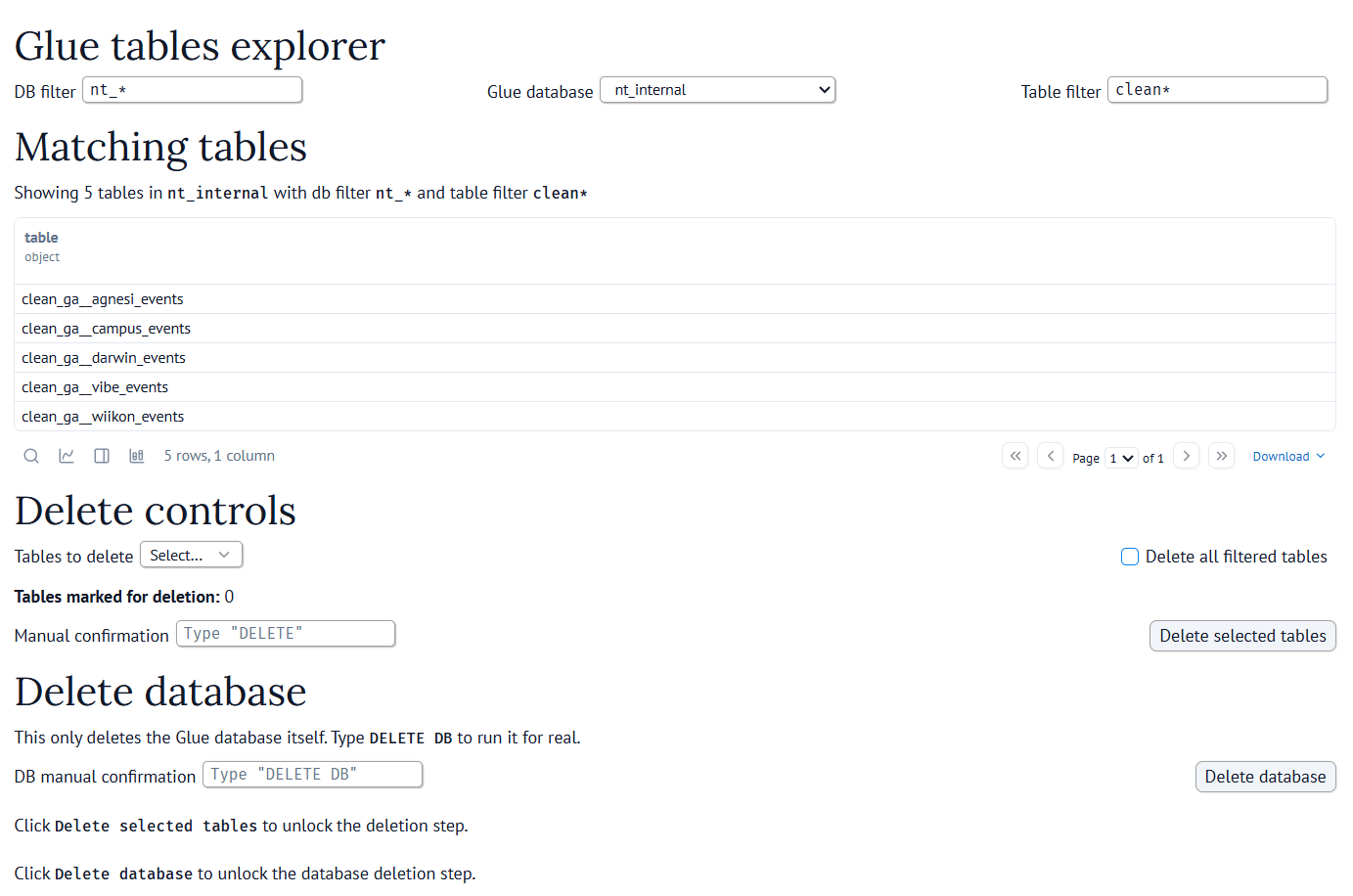
Here is a very small example:
import marimo as mo

tables = mo.ui.multiselect(
    options=["users", "sessions", "events"],
    label="Tables",
)
pattern = mo.ui.text(label="Filter")

controls = mo.vstack([
    mo.md("## Cleanup controls"),
    mo.hstack([tables, pattern]),
    mo.md(
        mo.callout(
            "This notebook can delete old Glue table versions.",
            kind="warn",
        )
    ),
])

with mo.status.spinner(title="Loading tables"):
    available_tables = get_tables()

controls
I think hstack and vstack are especially handy because they let you organize the notebook a bit better.
Without them, the widgets can end up feeling scattered.
This is enough to turn a notebook into a small internal tool without leaving Python.
SQL integration and plotting
This is another area where marimo is stronger than I expected.
On the SQL side, marimo has native SQL cells. These queries can run against dataframes, databases, warehouses, and lakehouses, and the result comes back as a Python dataframe.
I think that is a very nice model. You can query data with SQL, then continue working with the result in normal Python code without having to jump between different tools.
SQL cells use DuckDB by default as the in-memory engine, but marimo can also work with systems like PostgreSQL, MySQL, and SQLite through their Python connectors.
This is especially useful because the SQL cells are still part of the same reactive notebook. If the query changes, or if some upstream Python value changes, the dependent cells can update as well.
On the plotting side, marimo also looks quite good. It works well with interactive plotting, especially with libraries like Altair and Plotly, and I think that is the right angle.
Almost any notebook can render a chart. The interesting part here is that the plot can fit naturally into the reactive flow of the notebook.
If you want to get a feel for it, the marimo gallery has some very nice examples.
So for data exploration, the combination is very nice:
- query with SQL
- inspect the result as a dataframe
- plot it
- update the inputs and let the notebook refresh
I think this is one of the strongest parts of marimo for data work: SQL and plots are not bolted on, they fit naturally into the same reactive workflow.
A real example: recovering deleted S3 files
One example I like a lot is a marimo notebook I built for recovering deleted S3 files. I already explained the underlying recovery logic in Recover deleted S3 files with delete markers, so here I only want to focus on why marimo is a good fit for the interface.
The notebook has a very simple flow:
- select bucket, prefix, and time window
- explore the delete markers first
- inspect the preview
- run the recovery, ideally in dry-run mode first
That flow maps very naturally to marimo.
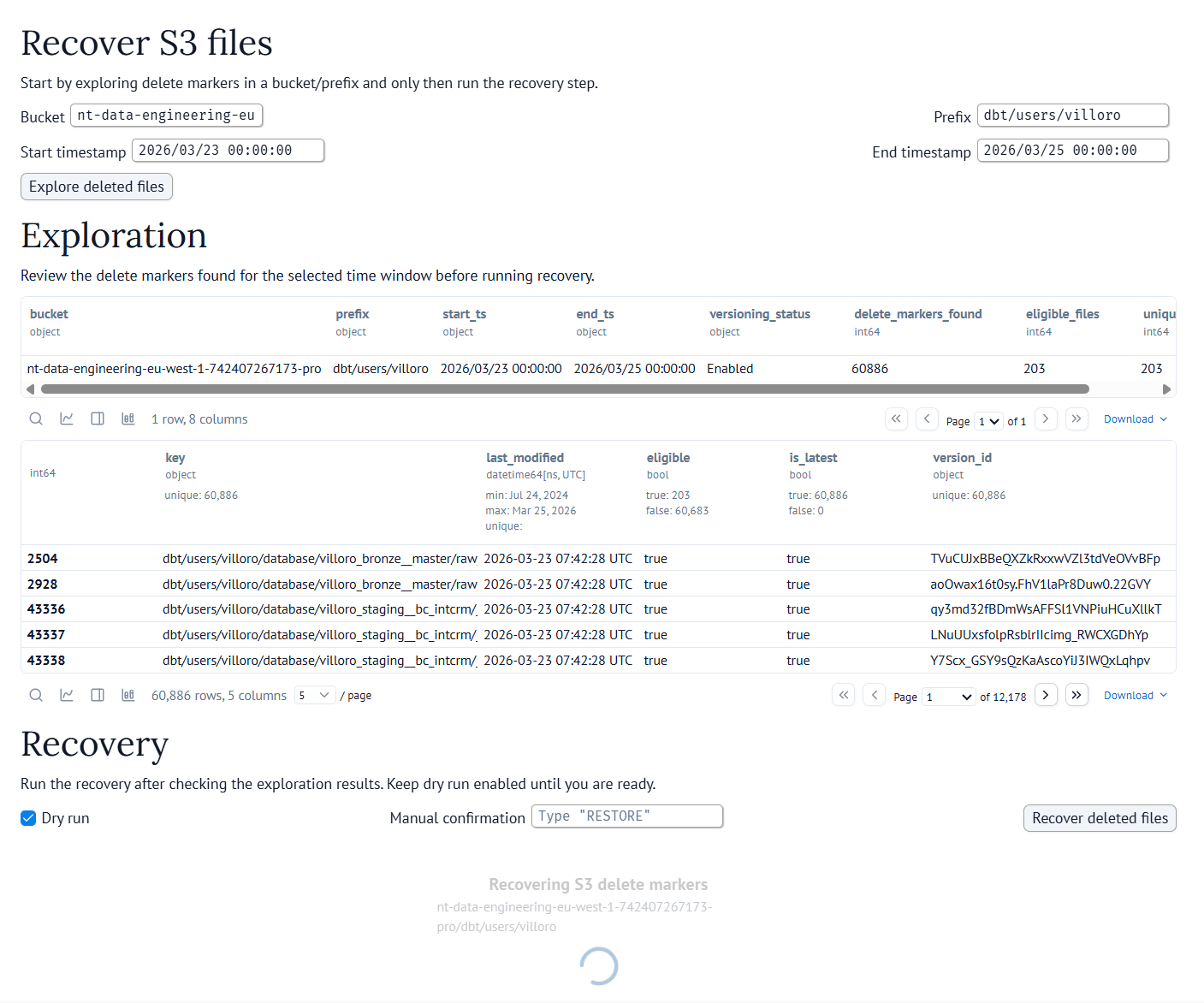
Here is a simplified subset of the notebook, just to show the structure:
This is only a small subset of the real notebook, just enough to show how the interface is structured.
import marimo

app = marimo.App(width="medium")


@app.cell
def _():
    import marimo as mo
    from scripts.recover_s3_files import recover_s3_delete_markers
    from scripts.recover_s3_files import scan_delete_markers
    return mo, recover_s3_delete_markers, scan_delete_markers


@app.cell
def _(mo):
    bucket = mo.ui.text(label="Bucket")
    prefix = mo.ui.text(label="Prefix")
    start_ts = mo.ui.text(label="Start timestamp")
    end_ts = mo.ui.text(label="End timestamp")
    explore_button = mo.ui.run_button(label="Explore deleted files")

    mo.vstack(
        [
            mo.md("# Recover S3 files"),
            mo.hstack([bucket, prefix]),
            mo.hstack([start_ts, end_ts]),
            explore_button,
        ]
    )
    return bucket, end_ts, explore_button, prefix, start_ts


@app.cell
def _(bucket, end_ts, explore_button, mo, prefix, scan_delete_markers, start_ts):
    mo.stop(not explore_button.value, mo.md("Click explore to load the preview."))

    with mo.status.spinner(title="Scanning delete markers"):
        df_preview = scan_delete_markers(
            bucket.value, prefix.value, start_ts.value, end_ts.value
        )

    return (df_preview,)


@app.cell
def _(df_preview, mo):
    mo.vstack(
        [
            mo.md("# Exploration"),
            df_preview,
        ]
    )
    return
I like this example because it combines most of the things I mentioned before:
- regular Python code
- UI elements
- reactive cells
- a notebook that can also behave like a small app
This is the kind of notebook that would feel awkward as a plain script and fragile in Jupyter, but feels very natural in marimo.
And I think this is exactly the kind of workflow where marimo makes a lot of sense.
Closing thoughts
Marimo gets a lot of small things right:
- notebooks are plain Python files
- execution follows dependencies between cells
- SQL and plots fit naturally into the workflow
- UI elements make it easy to build small internal tools
I still think Jupyter is great for quick exploration. But if the notebook is something you want to keep, review, or operate more than once, I think marimo is a very compelling alternative.