
Why multiple environments exist
The traditional setup: dev, test, sandbox, prod
In software and data engineering, it’s common to separate work into multiple environments. Code is built in dev, validated in test/staging, sometimes explored in a sandbox, and only then deployed to prod. The idea is simple: keep experiments and errors away from the systems that matter.
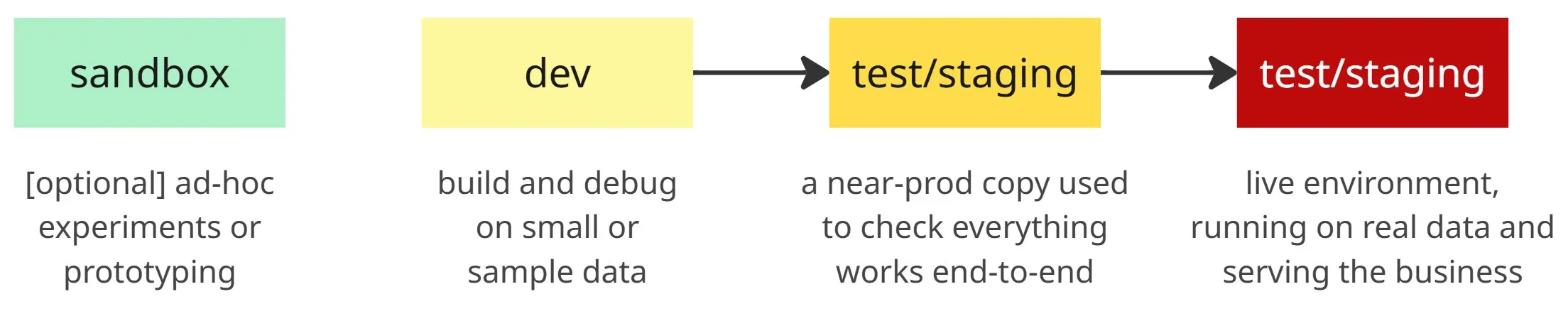
This layering reduces risk by catching problems earlier and isolating them from production.
What problems they try to solve
Multiple environments exist to:
- Test safely – experiment without risking real data.
- Prevent data loss – mistakes in dev/test don’t wipe out prod tables.
- Contain breaking changes – issues surface in lower envs first.
- Enable collaboration – teams can work in parallel without stepping on prod.
- Support CI/CD – changes move gradually from dev → test → prod, with checks at each step.
More environments mean more guardrails before code reaches production.
The dbt perspective
How dbt handles environments
In dbt, environments live in the profiles.yml. Each profile contains one or more targets that describe how dbt should connect: warehouse, database, schema, and credentials. This design means your project code doesn’t change — dbt simply decides where to build models based on the target.
The important piece is how dbt uses database/schema naming conventions. Instead of separate databases for dev and prod, dbt encourages using the same warehouse but isolating work with naming patterns. For example:
- Prod target → writes to a protected schema with a prefix like
prod_salesforce. - Dev targets → write to personal schemas using the developer’s name as prefix, e.g.
villoro_salesforce.
This allows everyone to work against the same production data and warehouse while keeping outputs separated. Developers can safely test changes in their own prefixed schemas without touching production tables.
Switching targets with profiles
Profiles make it easy to switch between these targets. By default, a developer might run dbt with a personal target, which builds into villoro_salesforce. When deploying, the pipeline switches to the prod target, which builds into prod_salesforce. You can read more about it at dbt | Understanding custom schemas.
The protected prefix (like prod_) is reserved for automated runs only. Developers shouldn’t have permissions to write there.
Both environments use the same underlying warehouse and data, so development runs closely mimic production. The only difference is the schema prefix — prod_ for production, <user>_ for development. This convention ensures realistic testing, strict protection of production outputs, and seamless promotion from personal work to production.
One environment to rule them all
The same idea can be applied outside of dbt. In Python projects, you can also run everything on production infrastructure while keeping outputs isolated.
How to make it safe
- Schema prefixes – follow the same pattern as dbt:
prod_salesforcefor production,villoro_salesforcefor a dev run. Everyone shares the same data and compute, but results go into different schemas. - Environment variables – control the prefix with an
ENVorSCHEMA_PREFIXvariable. Pipelines stay identical; only the destination changes. - Permissions – block developers from writing to
prod_schemas. Even if someone misconfigures, they can’t damage production tables.
Dealing with side effects
Code often does more than write tables: send emails, call APIs, trigger dashboards. These actions can be dangerous in a prod-only setup.
Use feature toggles to simulate side effects. In dev runs, log actions instead of executing them.
Example:
if env == "prod":
    send_email(user)
else:
    logger.info(f"[DEV] Would send email to {user}")
The same trick applies to API calls, data deletions, or notifications.
Patterns in practice
Many teams use this approach:
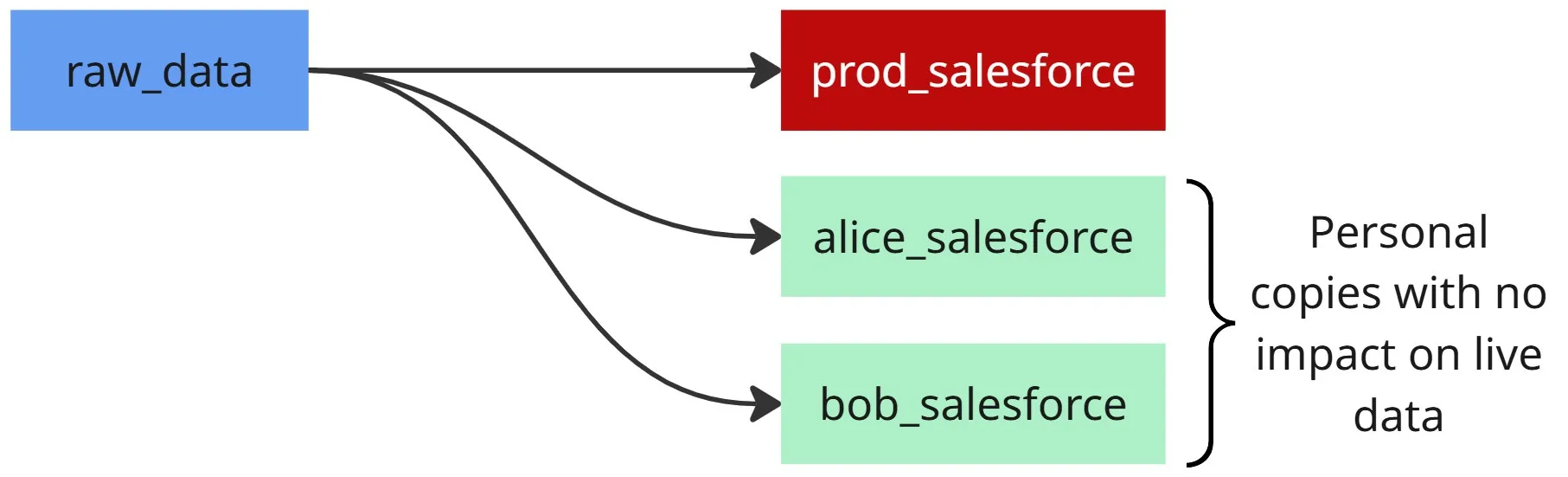
- Developers get personal schemas (
alice_salesforce,bob_salesforce). - Production jobs write only to
prod_salesforce. - CI/CD pipelines create temporary schemas for validation, then clean them up.
Pros and cons
Advantages: simplicity, less drift, fewer surprises
- Less infra – only one environment to manage.
- No drift – everyone works in the same place, no mismatched configs.
- Realistic dev – you test against real data and prod-like conditions.
- Faster cycle – no need to promote across multiple stages.
Risks: less safe experimentation, higher blast radius
- Unsafe tests – mistakes can impact prod data if not isolated.
- Bigger blast radius – a bad query or heavy job can hurt live workloads.
- Hard to stage big changes – limited space for dry runs.
- Onboarding stress – new devs must be careful from day one.
The main risk of prod-only is a higher blast radius — one mistake can affect critical data or workloads.
Mitigation strategies
- Schema prefixes –
prod_salesforcefor prod,villoro_salesforcefor dev. - Permissions – devs can’t write to
prod_schemas. - Feature toggles – in dev, replace side effects (e.g. email sending) with safe logs.
- CI in temp schemas – build and test in throwaway schemas before merging.
Combining schema isolation, strict permissions, and feature toggles gives most of the safety of multi-env setups, without the overhead.
Closing thoughts
When it makes sense to go prod-only
- Small teams that can coordinate easily.
- Mature pipelines with solid tests and monitoring.
- When cost and simplicity matter more than strict safety.
When you probably still want multiple environments
- Large or complex systems with many users.
- Workflows tied to external services.
- Heavy experimentation and schema changes.
- Regulated or sensitive data where staging is mandatory.